

At DTS, we always strive to provide the best training, support and after sales service in Product Lifecycle Management (PLM). From time to time we will carry out training & workshop that may be useful to you and your business. Feel free to check out our workshop calendar for any upcoming training & workshop.
Training

The Multi-axis Milling course is designed for NC/CNC programmers who machine simple or complex parts with fixed and variable tool capabilities. Students will learn how to create fixed and variable axis tool paths. You will also be introduced to NX workflows for machining contoured parts, high-speed machining methods, milling holes and threads, milling turbine blade type parts, and on machine probing.
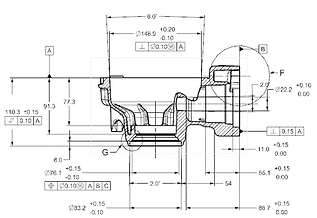
Learn how to use the NX Drafting application to create standards-compliant detailed engineering drawings that are fully associated to your 3D model. You will configure all drafting preferences using a preset standards file, create multi-sheet drawings with base and derived views, place associated dimensions and annotations on the drawing, and customize the drawing with view-dependent geometry and style changes. You will also explore techniques for working with assemblies and Product and Manufacturing Information (PMI).

NX Synchronous modeling is an alternative method is to allow organized design modifications to be made to non- parametric bodies (or even to parametric data, if necessary). Faces can be moved, deleted, offset, re-blended, etc., and adjacent body faces react to those changes. You will also learn that the Synchronous Modeling commands have the same functionality to retain it's modifications, and are able to 'record' in the Part Navigator (which allows further editing). The course provides a good understanding of how and when to apply Synchronous Modeling to existing CAD data.

The NX Essentials class is a great starting point for designers, engineers, and programmers with no NX training or experience. This course you will learn how to efficiently create, edit, assemble, and detail feature-based solid designs using parametric modeling practices and associative assembly and drafting techniques. New User Express teaches how to effectively use the basic tools necessary to create feature-based solid designs. With the aid of pre-established part files from a variety of industries, you quickly gain the confidence to further explore many options within the NX menus to achieve your required design intent. Once you are comfortable creating and editing solid models, you learn the basics of assemblies.

Learn how to create free form parts that update reliably and shift smoothly to the manufacturing application. You will learn how to incorporate freeform features into any part, from reverse engineered product models to complex engineering designs.

The NX Fixed Axis Machining training provides the ability to gain a detailed insight if the powerful 3-axis milling modules in NX. The modules enable the programmers to create milling programs in a structured way of prismatic and free form models. The module for processing residual material makes it possible to work the milling areas with a large milling cutter, after which the residual material will automatically be removed with a smaller tool. The training also elaborates on the High speed milling options within the milling modules. Previously this training was known as Advanced Manufacturing.

This course is intended to teach you about turning and lathe in NX.9.0 You will examine all aspects of turning, from creating a basic roughing operation to defining auxiliary operations. This course takes you through each phase of the turning process, from defining tools to creating operations and using templates. Key topics include: machining environment, operation creation, operation navigator, tool path visualization, operation status symbols, tool path submenu, drilling tool, turning tool, grooving tool, threading tool, tool library, lathe, lathe cross section, MCS-spindle, part boundary, blank geometry, avoidance control, containment, feed rates, cut regions, roughing parameters, cut patterns, rough facing, rough OD, rough ID, finish cut, finish turn, groove, drilling, threading, lathe control, templates, and teach mode. We should point out that this course does not teach the user how to be a programmer it teaches how to program using the NX software.

3D scanning methods, converting scanned data into 3D CAD models using NX Convergent Modeling, and studying real-world applications of these techniques across industries like automotive, aerospace, healthcare, and art restoration.

Offers participants a comprehensive introduction to the foundational aspects of the Tecnomatix Process Simulate software and an in-depth exploration of robotic path development. In the initial phase of the course, participants will become adept at navigating the software's interface, mastering essential modeling tools, and simulating diverse robotic operations.

Learn to create products requiring organic or aesthetically pleasing shapes using NX Realize Shape.

Offers participants an interactive platform for simulating intricate motions within electro-mechanical systems. Developed to bolster the integration of mechanical, electrical, hydraulic, and software elements throughout the entire product development journey, MCD streamlines processes from the early design phase.

Intermediate NX Design & Assembly is designed to advance students further up the productivity curve.